
Filming a conference starts with knowing what must be recorded, where each session takes place, and how audio will be captured. Beginner conference videographers need to plan around the schedule, room layout, AV setup, camera placement, power, backups, and final deliverables.
This beginner conference filming guide explains how to record conference sessions, capture clean audio and B-roll, manage camera coverage and backups, and confirm project details before the event.
How Do You Film a Conference?
Start by confirming the deliverables, room schedule, room layout, and AV access. For full session recordings, use cameras that can record continuously, place the main camera where it has a clear view of the presenter, and record audio from the room sound system when possible. For highlight videos, capture B-roll of the room, audience, signage, networking, and presenter activity.
What to Confirm Before Filming
Every conference project is different. Clarify expectations with the client before filming. Some projects only need B-roll, while others require full conference session recordings or both. The client may also want raw footage, edited videos, a highlight, interviews, or other deliverables.
Confirm the conference video deliverables before filming because they affect the schedule, crew, gear, storage, editing time, and price.
Solo Videographer vs. Camera Crew
A single conference videographer can cover sessions in one room or record B-roll when simultaneous coverage is not required.
Bring in additional camera operators when:
- Multiple rooms have sessions that must be recorded at the same time.
- The assignment requires simultaneous session coverage, interviews, B-roll, or other duties that one person cannot handle at once, which is common in multi-room conference video production.
If the assignment is only B-roll, simultaneous room coverage is less restrictive, but the schedule and distance between rooms still matter.
Preparation Before the Event
After you are booked, collect the conference schedule, room names, venue access details, parking or loading information, and the event-day point of contact. If sessions are being recorded, connect with the venue or event AV team before filming day so you know what audio outputs and presentation feeds are available.
Where Should You Set Up Cameras in a Conference Room?
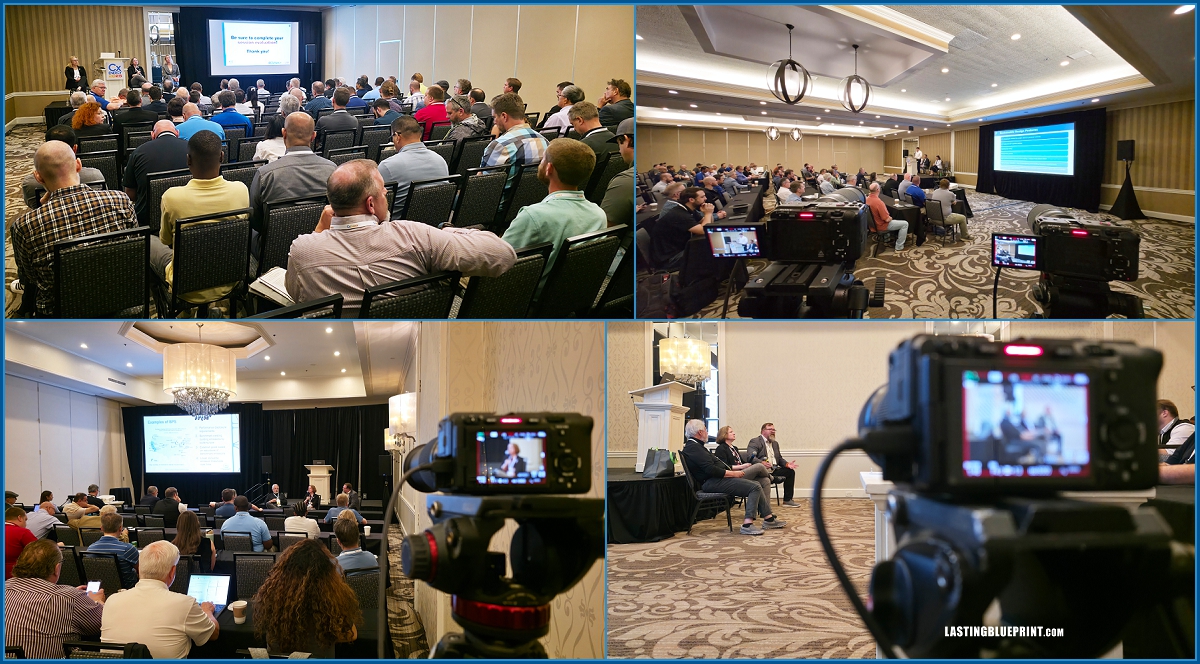
In a large ballroom, the main camera is often positioned toward the back of the room, ideally on a riser when one is available. Smaller breakout rooms may allow a back, side, or center-aisle position depending on seating, sightlines, and attendee traffic.
Understand the Room Before You Arrive
Ask the organizer for the room name and review the venue floor plan or room information in advance. If possible, scout the space. Room size affects camera position, lens choice, cable runs, and whether a shooting riser is useful.
Large ballrooms often require longer focal lengths because the camera may be positioned far from the stage. Smaller breakout rooms usually provide more flexibility, but you still need to avoid blocking aisles, exits, AV equipment, or attendee sightlines.
Cameras and Essential Gear
For full session recordings, use a camera that can record continuously for the expected session length. Conference sessions may run from 30 minutes to several hours. If you do not own suitable equipment, renting cameras and lenses can make more sense than buying gear for one project.
A stable video tripod is important for long-form coverage. Recording in 4K can also be useful even when the final delivery is 1080p, because the extra resolution allows limited reframing, cropping, or stabilization in post-production. For more background, see the difference between HD and 4K video production.
Gear Checklist
Camera that records long sessions (DSLR, mirrorless, cinema, or camcorder)
Telephoto/zoom lens for interchangeable-lens cameras (e.g., 70–200mm)
Heavy-duty video tripod
Dummy batteries or external power
Extension cords, power strips, gaffer tape
Audio recorder (Zoom F3, Zoom H4essential, or similar)
XLR cables
SD cards
Power Management
Conference days are long. Bring extension cords, power strips, and gaffer tape when the venue allows them, and secure any cable runs safely. For long session recordings, use compatible continuous power such as AC adapters, dummy batteries, USB-C power delivery, or external batteries supported by the camera. Do not rely on one small internal battery for an entire session.
How Do You Record Clear Audio at a Conference?
For presentation recordings, the preferred source is usually a feed from the room sound system. Coordinate with the AV team and confirm the connector type and signal level before the session. When a board feed is not available, a wireless lavalier, handheld microphone, podium microphone, or recorder placed near a PA speaker may serve as the primary or backup source depending on the situation.
Recorders such as the Zoom F3 or Zoom H4essential support 32-bit float recording, which provides extra level headroom, but you still need a clean source and a properly connected signal.
Whenever possible, record a second audio source for backup and check both during the day. Start recording before the scheduled session time because speakers may begin early. Carry the XLR cables and adapters needed for the AV system you expect to encounter.
Conference Camera Placement and Coverage
Camera placement depends on the room and the final deliverable. For a conference full session, prioritize a clear, unobstructed view and allow enough time to set up and test audio.
Two cameras provide more editing flexibility when the budget and crew allow it. A wide shot can serve as continuous coverage while a second camera captures a tighter view of the presenter. If you are working alone, make sure the wide camera remains safe while you adjust the tighter shot.
Recording Slides and Presentation Screens
If the presentation includes slides, ask whether the client or AV team can provide the original slide deck or a direct presentation feed. That usually produces cleaner results than filming the projection screen.
A camera or small recording device aimed at the screen can still be useful as a reference or backup for syncing the presentation in post-production. If you record the screen, match the project frame rate when possible and watch for flicker, exposure changes, and moiré.
Capturing Conference B-Roll
B-roll is useful for conference highlight and promotional videos. Capture wide room views, speakers, attendees, signage, networking, sponsor or exhibitor activity, and details that establish the location and event.
A gimbal or monopod can help when moving through the venue, while a telephoto lens can capture reactions or details from farther away without standing directly in front of attendees.
Recording, Backups, and Raw Footage Delivery
Use cameras with redundant recording options when practical and check media capacity before long sessions. Back up footage regularly rather than keeping the only copy on camera cards for the entire event. A common workflow is to copy the day’s footage to at least two separate storage devices before formatting or reusing cards.
If raw footage is part of the deliverables, allow time to organize and transfer the files. Large conference projects can produce hundreds of gigabytes or more, so upload speed, hard-drive capacity, shipping, and file-transfer time should be considered when quoting the job.
Post-Production and Delivery
After the event, confirm that you have the assets required for editing, such as logos, presentation files, speaker names, titles, or brand guidelines. Set the delivery timeline in the contract based on the number of recordings, editing scope, client review process, and any assets you are waiting to receive.
A longer project may reasonably need several weeks, while a simple clip may be delivered much sooner. The important part is setting an achievable timeline before production rather than promising a date that does not match the editing workload.
Business Considerations
Work within the agreed scope. If the contract specifies one camera, one room, or a defined number of hours, additional coverage should be discussed before it is added. Setup, breakdown, media management, travel requirements, and other production time should also be considered when pricing the job.
Contracts
Every paid conference project should have a written agreement. The exact payment terms depend on your business, but the contract should clearly state:
- event dates, locations, and coverage hours
- crew size and production scope
- rates, retainer or deposit terms, and balance due date
- overtime, travel, parking, cancellation, and rescheduling terms when applicable
- the number and type of deliverables
- editing and revision terms
- delivery timeline
- raw-footage terms if applicable
Templates can provide a starting point, but have your agreement reviewed by a qualified attorney for your business and jurisdiction.
Conclusion
Filming a conference comes down to preparation, reliable audio, stable camera coverage, and clear communication with the client and AV team. Confirm the deliverables first, plan around the room schedule, protect the recordings with backups, and build enough time into the day for setup and troubleshooting.
If you are learning conference videography, the related resources for videographers cover additional production and business topics, including how to start a video production company.