
An event video is a recording or edited video created from an event. Event video content can include full presentations, highlight or recap videos, attendee testimonials, interviews, opening videos, promotional clips, and supporting b-roll.
What should be filmed depends on the final deliverables. A project focused on a short recap needs different coverage than one that also requires complete presentations, interviews, sponsor footage, or videos for the next event. For broader production coverage, see our event video production services.
What Is an Event Video?
An event video documents part or all of a live event so the material can be watched, edited, or reused afterward. The event may be a conference, corporate meeting, trade show, annual meeting, training program, ceremony, launch, community event, or another organized gathering.
The term can describe both the footage recorded at the event and the finished videos created from that footage. For example, one event may produce a full presentation recording, a two-minute recap, several testimonial clips, and shorter promotional edits from the same day of filming.
What Event Video Content Can Include
Event coverage can include different footage depending on the schedule and intended use:
- full presentations, panels, demonstrations, or speaking sessions
- attendee, client, sponsor, speaker, or exhibitor interviews
- registration, networking, receptions, and general activity
- exhibitor booths, sponsor signage, displays, and product demonstrations
- audience reactions and interaction
- venue, room, stage, and setup footage
- supporting b-roll for highlight, testimonial, and promotional edits
Not every event needs all of these. The useful footage is the footage required for the videos that will actually be delivered.
When Event Videos Are Used
Before an event: footage from a previous event can be edited into a welcome, “Join Us,” “Why Attend,” “Why Exhibit,” or sponsor-focused video.
During an event: selected clips, interviews, or updates can be edited for immediate communication when the production schedule allows.
After an event: presentation recordings, recap videos, testimonial edits, interview clips, and other post-event videos can be published on websites, member portals, email campaigns, video platforms, or future event pages.
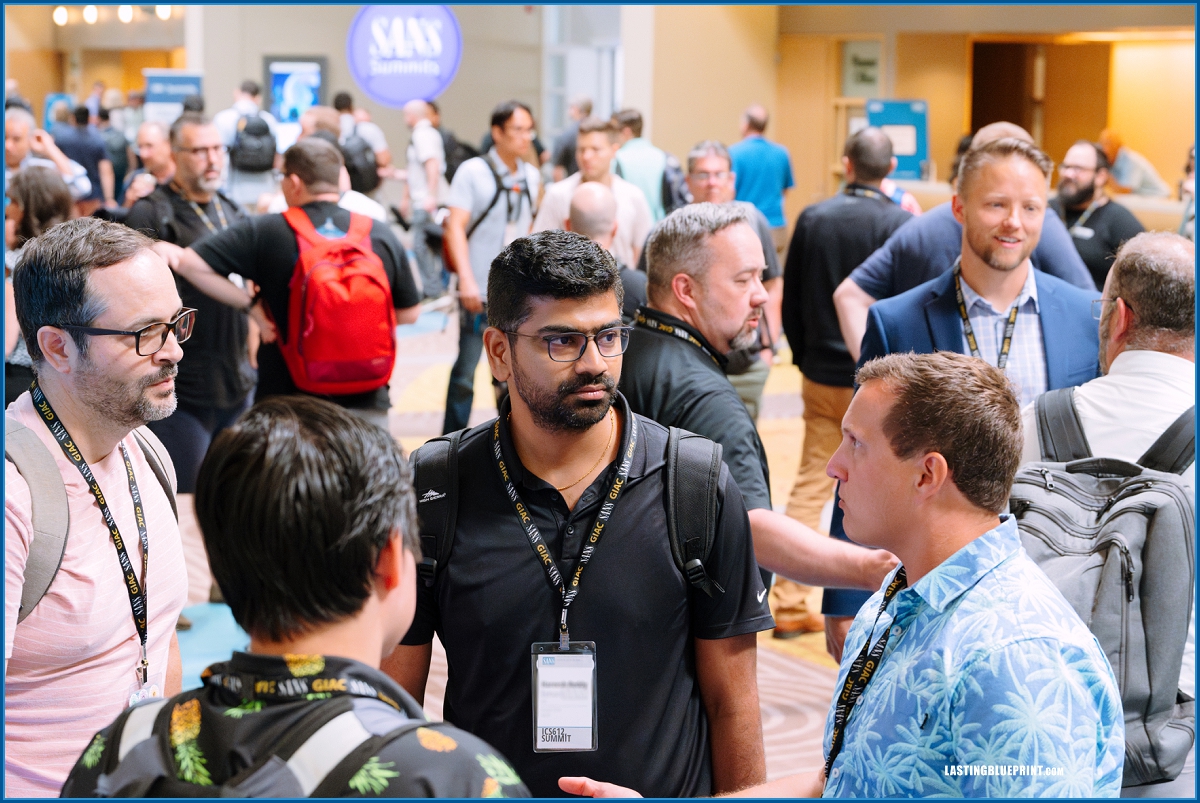
5 Types of Event Videos
These five formats cover some of the most common event video deliverables. Each requires a different filming plan, and several can be created from the same event when the necessary footage is captured.
1. Event Highlight and Recap Videos
A highlight video, recap video, or event highlight reel is a shorter edit that summarizes the event rather than showing it in full. It is normally edited after the event from selected moments such as presentations, networking, audience reactions, exhibitor activity, receptions, interviews, and venue b-roll.
What needs to be filmed: enough variety to show the people, setting, important program moments, and activity that define the event. If interviews or speaker quotes will be used, those must also be recorded with usable audio.
Example: We filmed the Social Media Conference presented by Ragan Communications and PR Daily at the Walt Disney World Dolphin Resort. The recap below combines conference activity, sessions, and attendee interaction into a shorter post-event video.

2. Event Testimonial Videos
Testimonial videos record specific feedback from attendees, clients, sponsors, presenters, members, or exhibitors while they are at the event.
When they are filmed: during scheduled interview windows, networking periods, breaks, or another part of the event when the participant can step away long enough to record a clear response.
What needs to be filmed: the interview itself with clean audio, plus supporting event footage that can provide context if the testimonial is edited into a larger piece. How event interviews are filmed affects the background, audio, pacing, and responses available in the final edit.
Example: At IT Nation Connect at Rosen Shingle Creek, we recorded a client testimonial for Timus Networks with Jim Smith of Proper Sky.

Testimonials recorded during an event can be delivered as individual videos or incorporated into a recap, future registration campaign, sponsor video, or other promotional edit.
3. Session and Presentation Recordings
Session recordings preserve a keynote, panel, breakout, training presentation, demonstration, or other scheduled program in full. They are filmed during the event and are typically delivered as separate videos rather than as one recap.
What needs to be filmed: a stable view of the presentation, clear audio from the presenter or sound system, and any slides, demonstrations, or additional camera angles required for the finished recording. If multiple rooms run at the same time, each room that must be recorded needs its own coverage plan.
See How Conference Sessions Are Filmed for a closer look at the camera and audio considerations involved.
4. Opening and Welcome Videos
An opening or welcome video is shown at the beginning of an event. Unlike most event videos, it is usually produced before the event starts. It may include leadership remarks, the event theme, information for attendees, or footage from a previous event.
What needs to be filmed: any new interviews or leadership messages required for the opening, plus archived footage from previous events when the video is designed to preview the experience.
Example: We produced a welcome video for the AABC Annual Meeting. The video was shown before the meeting began and reused footage from an earlier AABC annual meeting.
5. Event Promotional Videos
Event promotional videos use event footage to support a specific future action. Examples include “Join Us,” “Why Attend,” “Why Exhibit,” “Why Sponsor,” speaker-recruitment, teaser, and registration videos.
When they are filmed: the source footage is usually captured during the current event and edited later for the next event or campaign.
What needs to be filmed: footage that matches the future message. A “Why Exhibit” video needs exhibit-floor activity and exhibitor responses; a “Why Attend” video may need attendee testimonials, sessions, networking, and other footage that shows what participation includes.
Planning the promotional use before the event makes it easier to capture the interviews, sponsor placements, exhibitors, speakers, and b-roll that the later edit will require.
Planning Event Video Coverage
The filming plan should start with the deliverables. A highlight video requires broad event coverage. A presentation recording requires continuous camera and audio coverage. Testimonial videos require interview time and a workable recording location. Promotional videos may require specific sponsor, exhibitor, presenter, or attendee footage that would otherwise be easy to miss.
For conferences specifically, see how to plan video deliverables before filming when recordings, interviews, highlights, sponsor coverage, social clips, or raw footage are part of the project.
Also review the event schedule for overlapping activities. One videographer cannot record two simultaneous sessions in separate rooms, so multi-room or overlapping coverage may require additional operators or a broader production setup.
Event Video Production in Orlando
Lasting Blueprint Productions provides event video production in Orlando for business events that need planned filming, interviews, b-roll, session coverage, and edited deliverables.
If the project is limited to one operator covering a defined schedule, see our Orlando event videographer service. For a breakdown of planning, filming, editing, and delivery, see What Is Included in Event Video Production Services.